A private photo diary: your photos like a profile, never posted
You don’t have to post your photos to enjoy them. A private photo diary can be as simple as an album, or as rich as a profile of your own: your photos laid out with highlights, your days and your year, seen by nobody but you. Ricordo makes the second one on your iPhone, without an account.

Ricordo · Your photos. Your profile. Only youFree on the App Store, for iPhone and iPad
Download on the App Store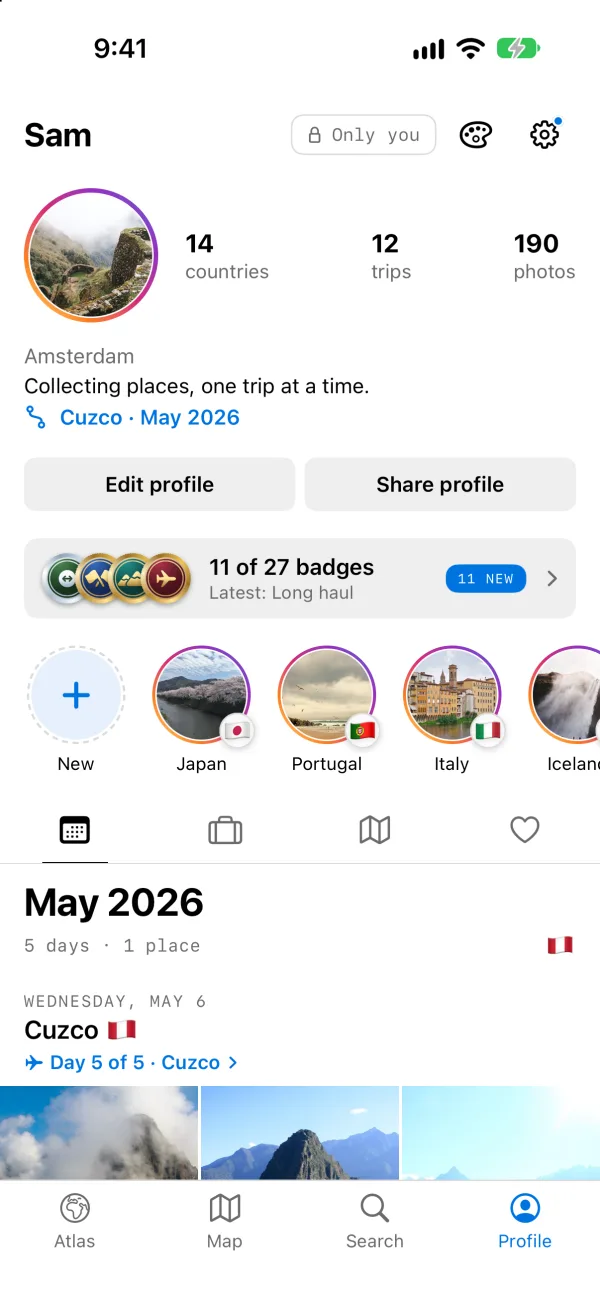
Why so many people stopped posting
Plenty of people love taking photos and have quietly stopped sharing them online. The reasons are familiar: the feeling of performing for an audience, counting likes, photos that stay up long after you’d rather they didn’t, and every picture living on someone else’s servers.
And yet the profile itself was nice. Your life at a glance, the best trips up top, a story for every place. The good part was never the audience; it was seeing your own photos laid out well.
Simple ways to keep a private photo diary
Before reaching for an app, these options cost nothing:
- Favourites and albums in Photos. Heart the photos that matter and make an album per year or per trip. Simple, but it’s up to you to keep it going.
- The Hidden album. For photos that really are just for you. On recent versions of iOS it’s locked with Face ID.
- A written journal with a photo a day. Lovely if you have the discipline. Most people manage a week.
- A private account on a social app. It feels private, but every photo is still uploaded to a company’s servers, and anyone you let in can take a screenshot.
What all of these have in common: you do the sorting. If you’d rather your photos arranged themselves, read on.
A profile with an audience of one
Ricordo lays out your photos the way social apps lay out a profile: your portrait and your numbers, highlights that play, your trips and your days. The difference is the lock at the top that says Only you.
- No one to perform for. Nobody sees your profile unless you choose to share something, and there’s no feed to keep up with.
- Hearts that are yours. Double-tap the photos you love. Nobody counts them and nobody sees them.
- In your order. Your photos by date, by trip and by place. No ads, and nothing pushed at you.
- No account. Nothing to sign up for. Your library stays on your iPhone, read where it is, never copied.
It all happens on the phone. How that works, and the little that ever leaves it, is in the private photo app guide.
Lay it out the way you like
Ricordo has ten styles, each with its own profile. Six borrow the layouts people know from social apps, like a tall photo grid or a wall with a cover photo, and four are Ricordo’s own. Atlas, Grid and Wall are free; the others come with Ricordo Plus, and you can try any of them on first.
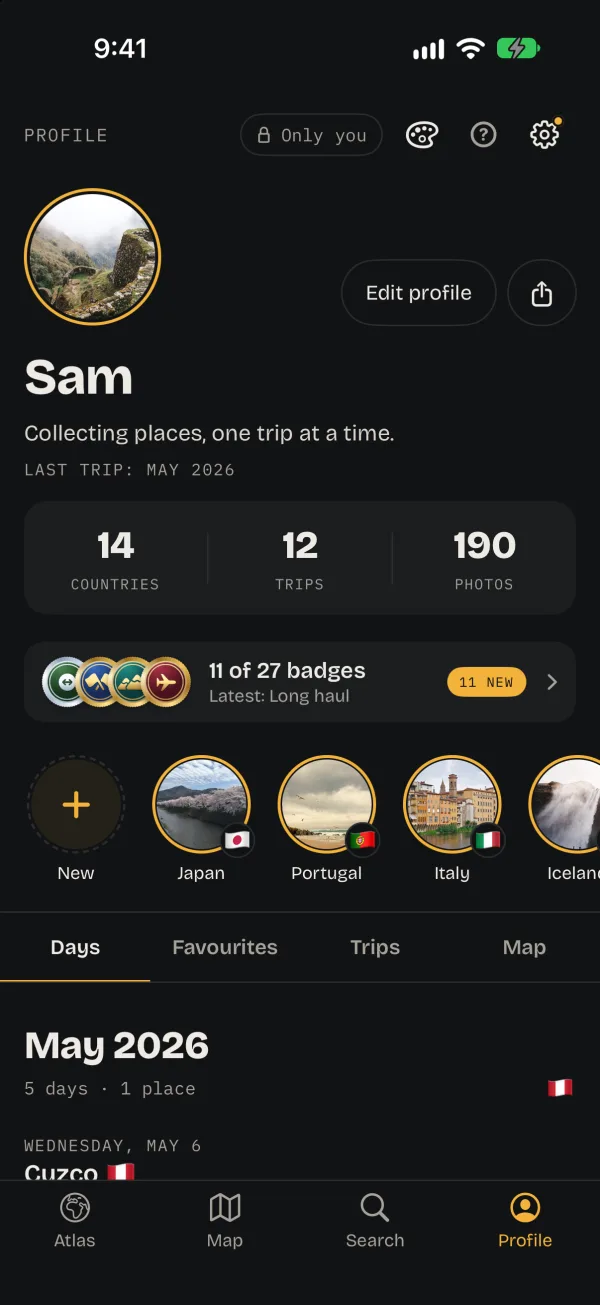
Scroll your own life, not a feed
Days shows your photos newest first, a day at a time: where you were, which day of the trip, and its best few. It’s the diary you never had to write.
Your countries, your home and each year become highlights, and you can make your own from the photos you pick. Tap one and it plays as a short film, with your photos whole and the place and date under each. See the guide to travel videos from photos.
When the year ends, it’s waiting as a story told by your photos: your countries, trips, favourite places and best moments. The year in review guide shows what’s in it.
Questions
Is Ricordo a social network?
No. There’s no feed, no followers and no one to perform for. Ricordo lays out your own photos like a profile, for you. Nothing is shared unless you choose it.
Are my photos uploaded?
No. Places, trips, faces and search are worked out on your iPhone. Only what you choose to share leaves it, smaller and without hidden data.
Do I need an account?
No. You only sign in with Apple if you want to share a trip, send postcards or see friends’ trips.
Can it look like the profiles I’m used to?
Yes. Six of Ricordo’s ten styles borrow the layouts people know from social apps. Grid and Wall are free, along with Ricordo’s own Atlas.
What does it cost?
Your profile, the atlas, the highlights and three styles are free. Ricordo Plus adds every other style, saving most films as videos and more. The film of your year is free to save.