A photo widget for couples, for the days you’re apart
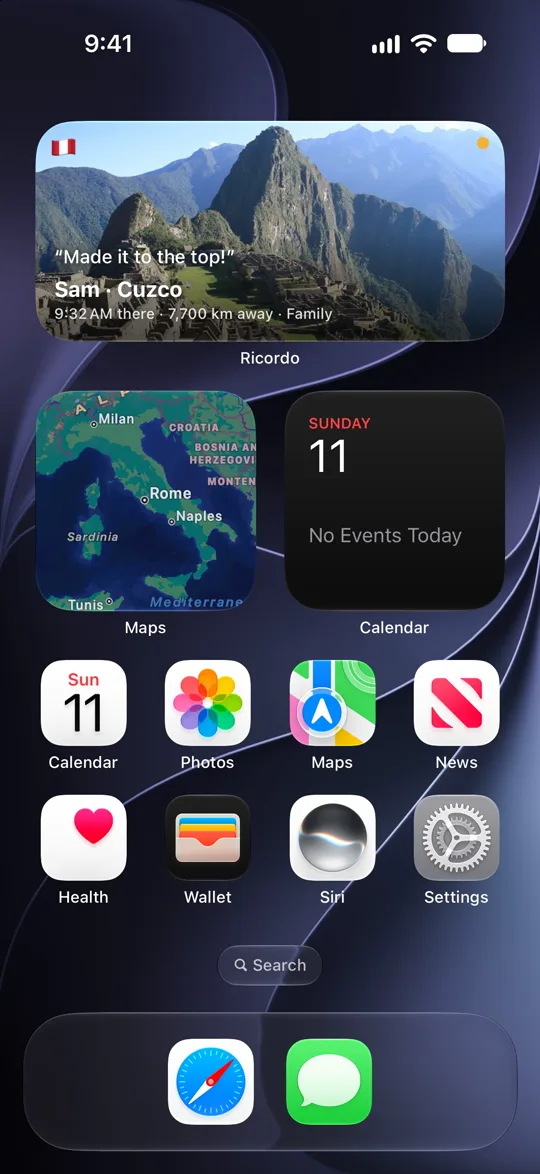
Pair your two iPhones once, and the photo you send lands on the widget on your partner’s Home Screen, with your city, the time where you are and how far away. In Ricordo it’s called a postcard: one invite link, one tap to pair, and it’s free.

Ricordo · Your day, on their Home ScreenFree on the App Store, for iPhone and iPad
Download on the App Store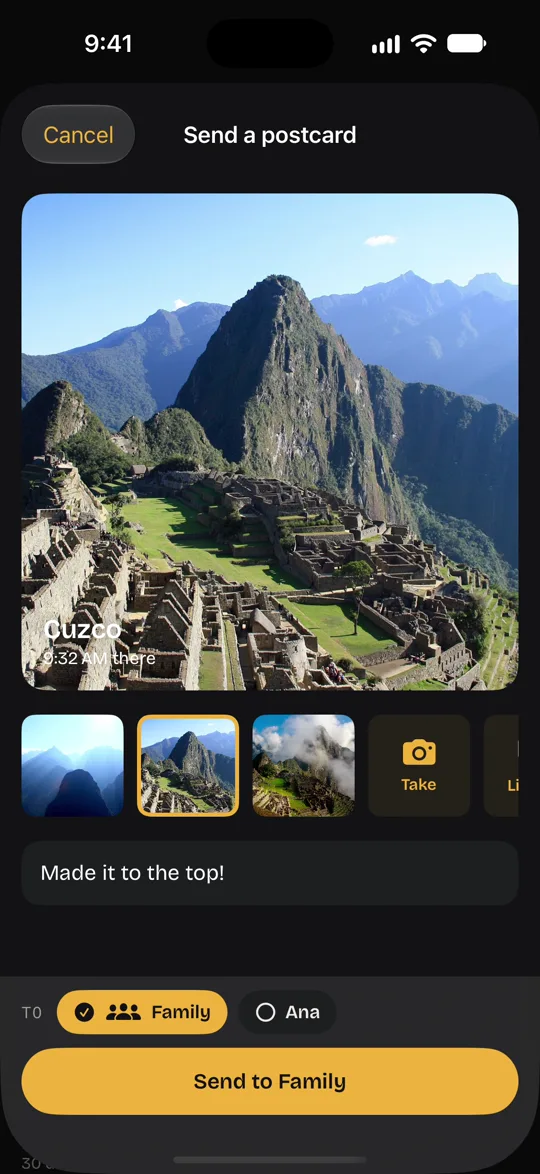
What a couples photo widget is for
Messages are for talking. A photo on the Home Screen is for something quieter: a glimpse of where the other person is, right now, without either of you having to stop what you’re doing.
It suits the times you’re apart:
- A work trip. A photo from the hotel window says “arrived safely” better than a text.
- Long distance. Different cities, different time zones, the same small window into each other’s day.
- One of you travelling. The trip with friends, the visit home, the conference: the other stays part of it.
Nobody has to reply, and nobody has to open an app. The photo is just there the next time they pick up their phone.
Pair with your partner
In Ricordo, pairing with one person takes a minute:
- Open the Postcards page in Ricordo (from the Postcards widget on your Atlas, or Settings) and tap + Invite.
- Choose to invite one person and send them the link.
- Your partner opens it on their iPhone or iPad with Ricordo, signed in with Apple. You’re paired. The link works once, for a week.
- You both touch and hold the Home Screen, tap Edit, then Add Widget, choose Ricordo and add the Postcards widget.
Already sending postcards to your family? A widget can show just one person: touch and hold it, tap Edit Widget and pick your partner. Put one for them and one for the family side by side.
Made for different time zones
The hardest part of being apart is often the clock. Every postcard shows the city you’re in, the time where you are and how far away you are, so your partner knows at a glance whether it’s breakfast or midnight for you, and when it’s a good moment to call.
Make it a habit, not a chore
The point is one moment, not a running commentary. Pick a photo from today, add a line if you like, and send it. That’s all.
On days away from home, Ricordo sends one reminder in the evening, with your best three photos of the day ready to send. It only does this once you’re paired with someone, and never at home, so it doesn’t nag on ordinary days.
Every postcard you send and receive is kept together in an album on your iPhone. After a long stretch apart, it reads like a small diary of both of your days.
Follow each other’s trips, too
Postcards are for today. For whole trips, Together in Ricordo lets you follow each other: turn on “Show your atlas to your people” and your partner sees your countries and your trips, and hears about your next one. You can write about each other’s trips or react to them, and only the two of you see what you write.
Want to share a trip with someone who doesn’t use Ricordo? Send it as a link instead. The guide to sharing a trip privately explains how.
Just between the two of you
- Nothing public. No profiles, no search. People join only through an invite link.
- Roughly where. A postcard carries your city and a point rounded to about 10 km. The photo is made smaller and cleaned of its hidden data.
- Gone in 30 days. Ricordo’s server deletes every postcard after 30 days. Your copies stay in your albums until you remove them.
- Yours to end. Unpair at any time.
The rest of your library never leaves your iPhone. See Private by design for the full list, or the family photo widget guide if you’d like to bring parents in too.
Questions
Do we both need Ricordo?
Yes. You both install Ricordo on an iPhone or iPad and sign in with Apple. Your partner taps your invite link once, and you’re paired.
Does my partner have to open the app to see my photo?
No. New postcards appear on the Postcards widget, and as a notification if they allow them.
Does it work when we’re in different time zones?
Yes. Each postcard shows the time where you are and how far away you are, so the other person knows when to call.
Can I unpair later?
Yes, at any time. You can also report or block someone.
Is it free?
Yes. Postcards are part of free Ricordo.