A family photo widget: your photos on their Home Screen
A family photo widget puts the photo you send on the Home Screen of the people at home, so they see it without opening anything. In Ricordo, you start a family group, everyone taps one link and adds the Postcards widget, and each photo you send lands there with where you are and the time there.

Ricordo · Take your family on every tripFree on the App Store, for iPhone and iPad
Download on the App Store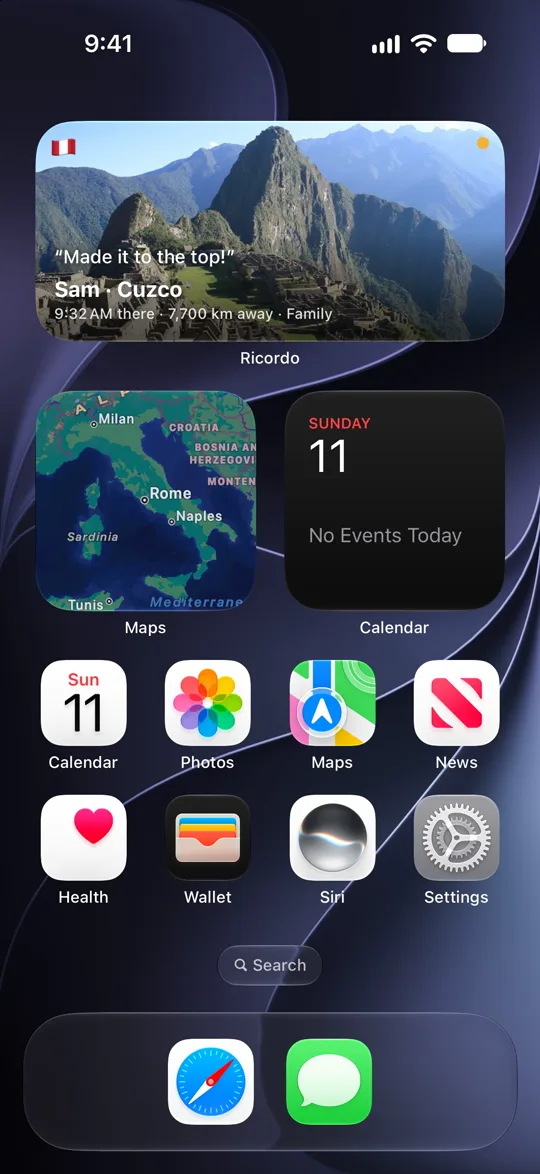
Why a widget beats the family chat
The family chat is where holiday photos go to get lost. Forty photos arrive at once, someone replies with a thumbs up, and by the evening they’re buried under a question about Sunday lunch. Parents and grandparents often never scroll back to find them.
A widget works the other way round. The photo is simply there, on the screen they look at all day:
- Nothing to learn. No feed to check and no app to open. The newest photo is on the Home Screen.
- One moment, not a hundred. A single photo from the day says more than a camera roll dropped into a chat.
- The time there. They see where you are, the time there and how far away, so they know when to call.
Set it up once: start a family group
With Ricordo’s postcards, the first two steps happen once and then never again.
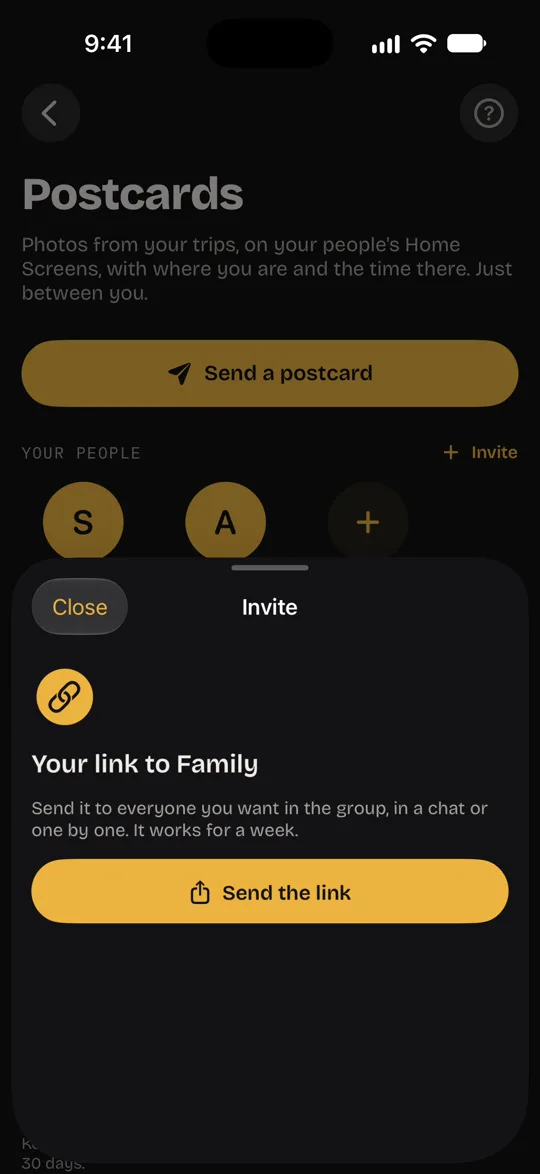
- In Ricordo, open the Postcards page (from the Postcards widget on your Atlas, or Settings) and tap + Invite. Start a group, call it Family, and you get one link for everyone. A group can have up to 20 people.
- Send the link in your family chat, or to each person on their own.
- Each of them installs Ricordo on their iPhone or iPad, signs in with Apple and taps your link to join.
- They touch and hold their Home Screen, tap Edit, then Add Widget, choose Ricordo and pick the Postcards widget.
Setting it up for parents and grandparents
If the people you’re sending to aren’t keen on new apps, do the set-up together, ideally before you leave. It takes a few minutes, and after that they never need to touch it.
- Put the widget on the first page of their Home Screen, where they’ll see it every time they unlock the phone.
- Pick a widget size they can see easily. Bigger is kinder to older eyes.
- Ask whether they’d like a notification when a new postcard arrives. It’s their choice; the widget updates either way.
- Tell them every postcard they receive is kept in an album in Ricordo, if they ever want to look back.
They don’t need to travel, or use anything else in the app. Ricordo is the same app you use, but for them it can be nothing more than a photo frame on the Home Screen.
Send a postcard from your trip
On your trip, pick a photo from today, add a line and choose who it’s for: the whole family, another group, or one person. It lands on their widgets with the city, the time where you are and how far away.
If you forget, Ricordo can remind you. On days away from home it sends one reminder in the evening, with your best three photos of the day ready to send. Never at home, and only once you’re paired with someone.
Want them to see the whole trip later? Send a link to it when you’re back. The guide to sharing a trip privately shows how.
One widget for everyone, or one per person
A widget can show postcards from everyone, from one group, or from just one person. Touch and hold the widget, tap Edit Widget and choose. Grandparents with grandchildren in different places can put one widget per family side by side.
Travelling as a couple, too? The couples photo widget guide covers pairing with just your partner.
What the family sees, and what stays private
Postcards leave your phone, so they share as little as possible:
- Only who you invite. No profiles, no search, nothing public. People join only through your link.
- Roughly where. A postcard carries your city and a point rounded to about 10 km. The photo is made smaller and cleaned of its hidden data.
- Gone in 30 days. Ricordo’s server deletes every postcard after 30 days. The copies on your family’s phones stay until they remove them.
- Always in your hands. Unpair, leave a group, report or block at any time.
Everything else Ricordo does with your photos stays on your iPhone. The full list is on Private by design.
Questions
Does my family need Ricordo?
Yes. They install Ricordo on their iPhone or iPad, sign in with Apple and tap your link. They don’t need to travel or use anything else in the app.
Do they have to open the app to see my photos?
No. New postcards appear on the Postcards widget, and as a notification if they allow them.
Can a widget show just one person?
Yes. Touch and hold the widget, tap Edit Widget and choose everyone, a group or one person.
How many people can be in a family group?
Up to 20. You can also make more than one group, like Family and Friends, and choose who each postcard goes to.
Is it free?
Yes. Postcards are part of free Ricordo.