Where was this photo taken? How to see it on iPhone
Open the photo in Photos and swipe up, or tap ⓘ. If the photo has a location, a small map shows exactly where it was taken, with the place’s name. No map means the iPhone didn’t save a location for it, and there are a few common reasons why.

Ricordo · Every photo, on the map where it was takenFree on the App Store, for iPhone and iPad
Download on the App Store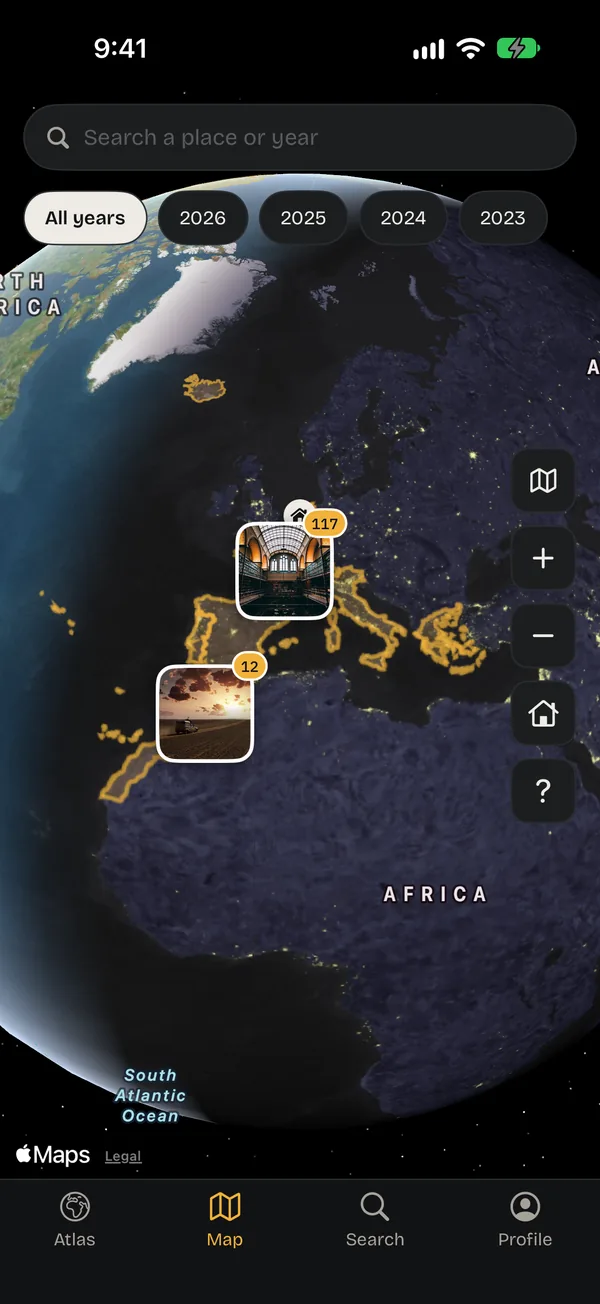
See where one photo was taken
- Open the Photos app and tap the photo.
- Swipe up on the photo, or tap the ⓘ button at the bottom.
- Look under the date and camera details: a map shows where the photo was taken, with the name of the place.
- Tap the map to open it bigger.
The same panel shows the date and time, the camera or iPhone that took it, and the lens. If there’s no map at all, the photo was saved without a location. Skip to why some photos have no location.
See all your photos on a map
Photos can also show your whole library on a map, so you can see everywhere you’ve taken pictures at once.
- iOS 17: open Albums, scroll to People & Places and tap Places. Switch between the map and a grid of photos.
- iOS 18 and later: open your collections and tap Map. It’s one of the pinned collections.
Zoom in and the photos split into smaller groups, down to the street. It’s a lovely way to wander through old trips, though it won’t tell you how many countries or cities that adds up to. For that, see how many countries you’ve been to, or our longer guide to seeing your photos on a map.
Why some photos have no location
A photo only has a location if one was saved with it when it was taken, and kept along the way. The usual reasons it’s missing:
- The Camera wasn’t allowed to use your location. The iPhone saves where a photo was taken only when the Camera may use Location Services.
- It was saved from a chat app. Most messaging apps remove a photo’s location before sending it, so the copy you save has none.
- Someone turned it off when sharing. The share sheet’s Options has a Location switch, and turning it off sends the photo without its place.
- It came from another camera. Many cameras have no GPS, and scans of prints never had a location to begin with.
- It’s a screenshot or a downloaded image. These are saved where they’re made, not where you are, so they don’t carry a place.
To make sure new photos keep their place, go to Settings → Privacy & Security → Location Services → Camera and choose While Using the App. Leave Precise Location on for the exact spot rather than the rough area.
When a photo has no location
You can give a photo its place by hand in Photos: tap ⓘ, then Add Location (or Adjust to change one), and search for the place. You can even fix a whole batch at once. The steps are in adding a location to photos on iPhone.
If you have hundreds of them, from years of chats or an old camera, Ricordo can help. It groups photos without a location into moments and suggests where they were, from your flights and the photos you took around them, so one answer places a whole afternoon.
Every place in your library, named for you
Looking up photos one by one is fine for a single picture. To see every place at once, with names, Ricordo reads the location of each photo in your library, right on your iPhone, and sorts them into countries, cities and trips on its own.
- Every photo with a location finds its country and city, from 160,000 cities kept on the phone, so it works on a plane.
- The Map tab shows the best photo from every place, with how many you took there. Tap a place to see every photo from it.
- Pick a year to see that year’s trips drawn across the map.
Ricordo only reads your photos. It never moves, copies or changes them.
Questions
How do I see where a photo was taken on iPhone?
Open the photo in Photos and swipe up, or tap ⓘ. If it has a location, a map shows where it was taken, with the place’s name.
Can I see where a photo someone sent me was taken?
Only if its location came with it. Most chat apps remove it. If the sender left Location on in the share sheet’s Options, the ⓘ panel shows it like any of your own photos.
Why does my iPhone not save where photos were taken?
The Camera probably isn’t allowed to use your location. Go to Settings → Privacy & Security → Location Services → Camera and choose While Using the App.
Can I remove the location from a photo?
Yes. Tap ⓘ, then Adjust next to the map, and choose No Location. To keep the photo’s place but not send it, turn off Location in the share sheet’s Options when you share.
Does Ricordo send my photos’ locations anywhere?
Places are worked out on your iPhone. With Apple Maps place names on, Apple Maps gets the middle of each place, rounded to about 1 km, once per place, and you can turn that off in Settings → Internet.