How to use shared albums on iPhone
In Photos, scroll to Shared Albums, tap +, name the album and pick the photos, then invite people. In iOS 27 you can also share a link that anyone can open, Android included. Albums made in iOS 27 keep photos at full resolution and count toward your iCloud storage; older ones keep smaller copies that don’t.

Ricordo · A trip, shared as a linkFree on the App Store, for iPhone and iPad
Download on the App StoreTurn on Shared Albums
- Open Settings, tap your name, then iCloud → Photos.
- Turn on Shared Albums.
In iOS 27, shared albums need iCloud Photos on too, except for a temporary shared album.
Make a shared album
- Open Photos and scroll to Shared Albums: in your collections on iOS 18 and later, in Albums on iOS 17.
- Tap +, name the album and choose the photos.
- In iOS 27, tap Sharing Options to choose between inviting people, whom you approve, and sharing by link.
People in the album can add their own photos, videos and comments while Can Add Photos is on (Participants Can Add Photos in iOS 26 and earlier).
Invite people, Android included
iOS 27 and later
Open the album, tap the Manage Shared Album button, then Invite Participants under Participants, or Copy Album Link to send it in any chat. People can join from the link on any phone or computer, and add their own photos on the web, even without an Apple Account.
iOS 26 and earlier
Open the album, tap the More button (•••), tap the album’s name, then Add Participants under Participants. For people without an Apple device, tap the More button, then Shared Album Details, and turn on Public Website: the photos then open in any browser, for anyone who has the link, including anyone it’s forwarded to.
Storage and limits
iOS 27 changed how shared albums are kept. What an album uses depends on where it was made:
| Made in iOS 27 or later | Made in iOS 26 or earlier | |
|---|---|---|
| iCloud storage | Counts toward the owner’s, including what others add | Doesn’t count |
| Photos | Full resolution, original format | Made smaller: 2,048 pixels on the long side |
| Videos | Full resolution | Up to 15 minutes, at up to 720p |
| Photos and videos per album | As many as the owner’s iCloud storage holds | 5,000 |
| People | Up to 100, including you | Up to 100 subscribers |
A temporary shared album doesn’t count toward anyone’s iCloud storage and holds up to 5,000 photos and videos from everyone. When you upgrade an older album, what’s already in it still doesn’t count, but anything added afterwards does.
A shared album isn’t a backup. Older albums keep smaller copies, so keep the originals in your own library.
Share a trip without a shared album
For a trip, a shared album holds the photos but not the trip itself. Ricordo shares a trip as a link instead: the route through each city on a map, the dates, and only the photos you pick. It opens in any browser, nobody needs an account to see it, and you can stop it whenever you like. Sharing a trip is free; the first time, you sign in with Apple.
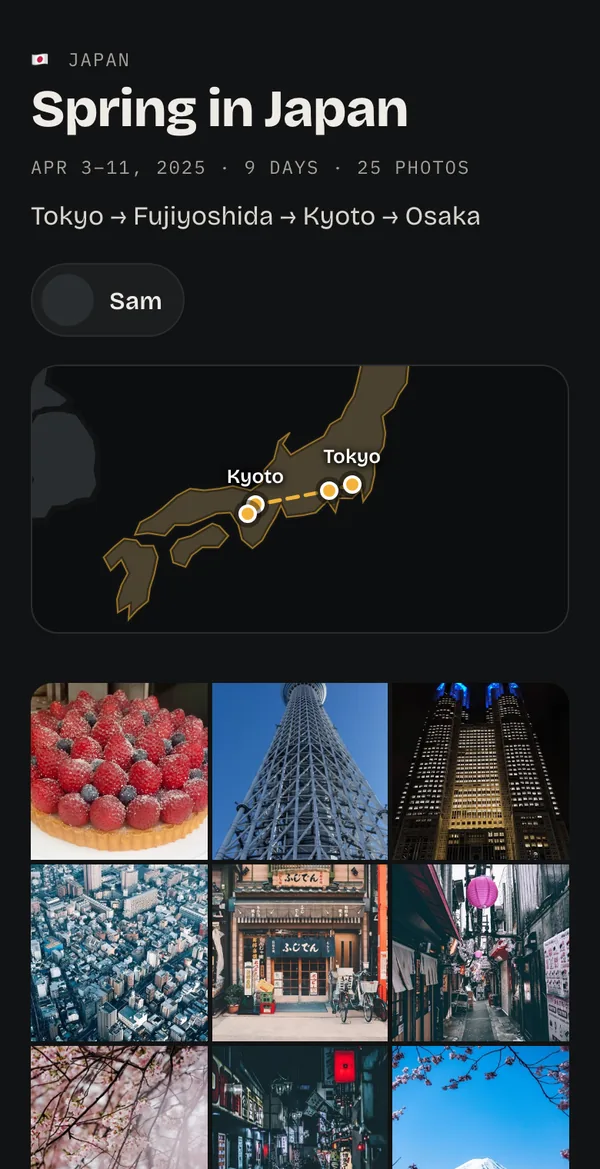
Ricordo builds your map from your own library only. Photos in shared albums, and in your Hidden album, are left out, so a friend’s photos never add countries to yours. For family who’d rather not open anything, a postcard on their Home Screen brings one photo a day. More in sharing trip photos privately.
Questions
Do shared albums count toward iCloud storage?
Albums made in iOS 27 or later count toward the owner’s iCloud storage, including photos others add. Albums made in iOS 26 or earlier don’t.
Can Android users see an iPhone shared album?
Yes. In iOS 27 they can join from the album link and add photos on the web. For older albums, turn on Public Website and send them the link.
Why do shared album photos look lower quality?
Albums made in iOS 26 or earlier make photos smaller, 2,048 pixels on the long side. Albums made in iOS 27 keep full resolution.
How many photos can a shared album hold?
Older albums hold 5,000 photos and videos. Albums made in iOS 27 hold as many as the owner’s iCloud storage allows; temporary ones hold 5,000.
Does Ricordo count photos in shared albums?
No. Ricordo builds your map and trips from your own library only, so shared albums and the Hidden album are left out.