A travel bucket list map: where you’ve been, and where you’re going
Put your bucket list on the same map as the countries you’ve already been to. Seeing both together shows the gaps at a glance: the region you’ve never touched, the country next door to one you loved. Then keep it short, give every place a reason, and let the been-there half fill in by itself.

Ricordo · Where you’ve been, and where you want to goFree on the App Store, for iPhone and iPad
Download on the App Store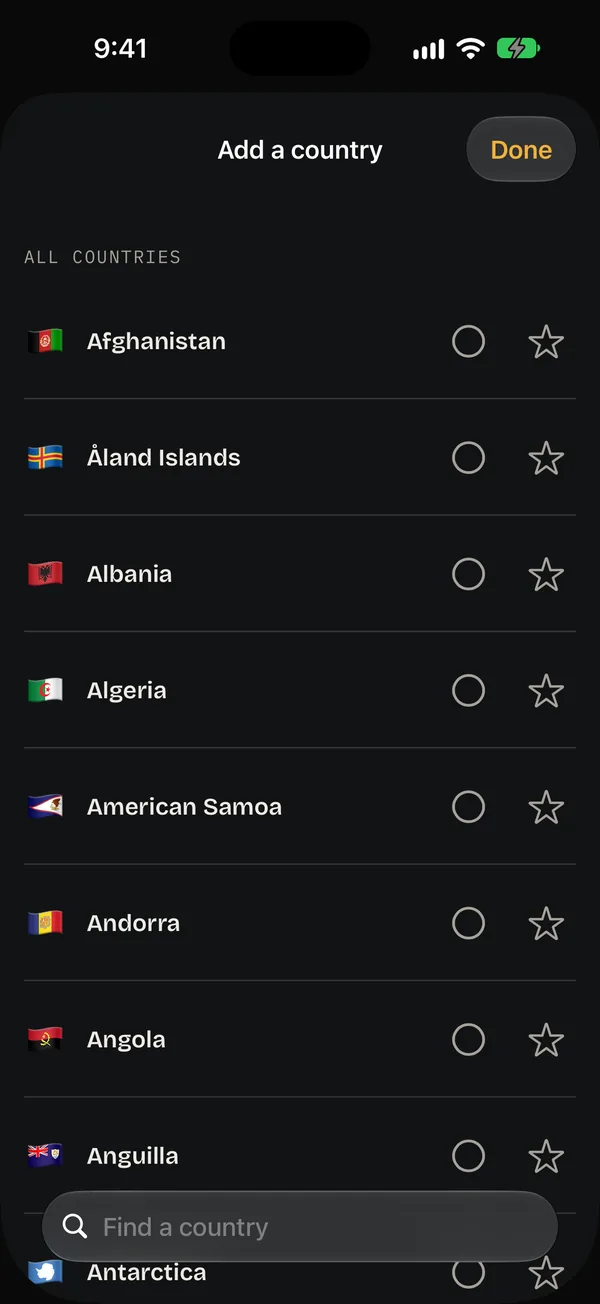
Why a map beats a list
A list in your notes app grows and grows and never changes much. A map does something a list can’t: it shows where you haven’t been. Whole continents still dark, a gap between two countries you know well, a neighbour you could add to the next trip.
It also keeps the list honest. When the countries you’ve visited light up beside the ones you want to see, you can tell which dreams you keep putting off.
How to keep a bucket list you’ll use
- Start with countries, then add the one place in each that pulls you there.
- Write down why. A reason (a food, a festival, a friend) turns a wish into a plan.
- Note the season. Many places are at their best for a few weeks a year.
- Keep it short. Ten places you mean is better than a hundred you might.
- Look at it once a year, when you look back at the year you had.
Look at what’s near the places you’ve loved. The best next trip is often one border away from a good one.
First, the been-there half
A bucket list map needs to know where you’ve already been. Two quick ways:
- Tick them off in your browser with our free countries visited map. Nothing to install.
- Let your photos fill it in. Every photo with a location knows its country. See how many countries have I been to.
Both halves in Ricordo
Ricordo lights up every country you’ve photographed on a globe, on your iPhone, and keeps your bucket list right beside it:
- Tap + to add a country.
- Every country has a circle for been there and a star for Want to go. Search for the one you want.
- Tap the star. It joins your Want to go list.
- Countries you went to before your iPhone get the circle instead. They count on your Atlas and glow softer on the globe.
When you finally go, you don’t have to tick anything: take photos there, and the country lights up from them, with its cities and the trip.
Plan forward by looking back
The best bucket lists are made with your travels in front of you. Press play on Ricordo’s time machine to watch your countries arrive in the order you first went, or open your year in review to see what was new (see a year in review from your photos). If you like the poster on the wall, there’s a version that fills itself in: a digital scratch map.
Questions
How do I make a travel bucket list map?
Mark the countries you’ve been to and the ones you want to visit on the same map. Ricordo does both: your photos fill in where you’ve been, and a star adds a country to Want to go.
Is there an app for countries I want to visit?
Ricordo keeps a Want to go list next to the countries you’ve visited. Tap + to add a country, then its star.
Can I add countries I’ve been to without photos?
Yes. Add them with the circle for been there. They count on your Atlas and glow softer on the globe than the ones from your photos.
Is it free?
Yes. The map, adding countries and Want to go are part of free Ricordo.