How to see everywhere you’ve been on your iPhone
Your iPhone keeps two records of where you’ve been. Significant Locations, in Settings → Privacy & Security → Location Services → System Services, lists the places you’ve been recently. Your photos keep the rest: every photo taken with Location Services on remembers where it was taken, going back years.

Ricordo · Every place you’ve been, years backFree on the App Store, for iPhone and iPad
Download on the App Store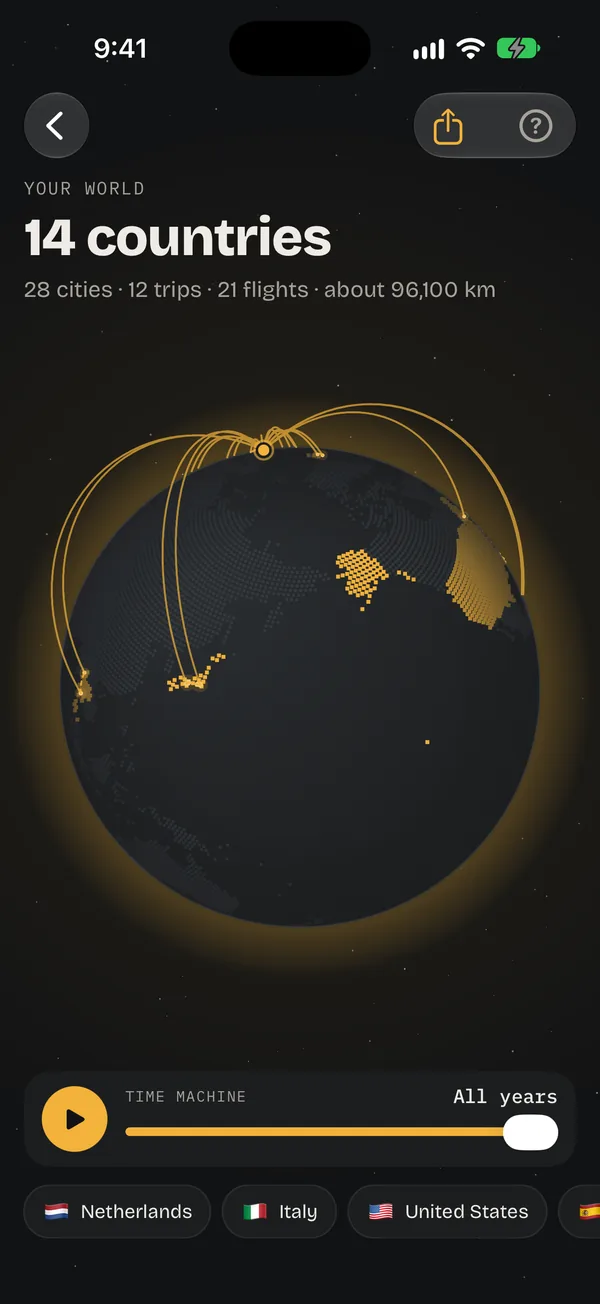
Significant Locations: the places you’ve been lately
Significant Locations is the iPhone’s own list of places that matter to you. It’s a little hidden:
- Open Settings and tap Privacy & Security, then Location Services.
- Scroll to the very bottom and tap System Services.
- Tap Significant Locations & Routes (just Significant Locations on older iOS), and confirm with Face ID, Touch ID or your passcode.
- Look through the places you’ve been recently, with dates. Tap one to see it on a map.
Apple uses it on the iPhone to learn the places you go, for things like suggestions in Maps and memories in Photos. The list is kept on your devices and encrypted, so Apple can’t read it.
You can clear it with Clear History at the bottom of the same screen, or turn it off with the switch at the top.
Why it isn’t a travel history
Significant Locations is built for the iPhone’s suggestions, not for looking back. That shows when you try to use it as a record of your travels:
- It only covers recent history. Trips from a few years ago won’t be there.
- It only knows what it saw. If it was off, or you were on another phone, those places are missing.
- It lists places, not trips. There’s no count of countries or cities, no route and no dates away.
For the years before that, and for the big picture, your photos are a far better record.
Your photos remember much further back
Every photo taken with Location Services on keeps where it was taken, and that stays with it for as long as you keep the photo, through new phones and years of backups. The Photos app can show them all on a map:
- iOS 18 and later: open Photos, scroll down to your collections and tap Map.
- iOS 17: open the Albums tab and tap Places.
Zoom out and you can see years of travel at once. The full how-to, and why some photos are missing from the map, is in how to see your photos on a map.
Your whole travel history, from your photos
The Photos map shows dots. Ricordo reads the same locations and dates on your iPhone and turns them into a travel history you can read:
- Every country and city you’ve photographed, lit up on a globe, with your number at the top of your Atlas.
- Every trip, found from home and away: a trip starts when your photos are more than 50 km from home and ends after more than two days without photos away, or a day back home.
- The time machine: press play and watch your countries arrive in the order you first went.
- As far back as your photos go, including older ones from Google Photos, brought in with a Takeout export.
Countries you went to before your iPhone, or didn’t photograph, can be added by hand. Need the list with dates, for a form? See finding your travel history. Just want the number? See how many countries have I been to.
Keeping it to yourself
Where you’ve been is personal. Both of these records stay with you: Significant Locations is kept on your devices, and Ricordo works out your places and trips on your iPhone, with no account, so your photos aren’t uploaded anywhere. Exactly what Ricordo sends, and when, is on Private by design.
Questions
How do I see my location history on iPhone?
Go to Settings → Privacy & Security → Location Services → System Services → Significant Locations & Routes. It lists the places you’ve been recently. For older travels, your photos’ locations go back much further.
How far back does Significant Locations go?
Only recent history, so it won’t show trips from years ago. Photos keep their location for as long as you keep them, which makes them the better record for older travels.
Can I see every country I’ve been to on my iPhone?
Not in Settings. Ricordo reads where your photos were taken and lights up every country and city you’ve been to, with every trip, on your iPhone.
Is my location history private?
Significant Locations is kept on your devices and encrypted, and you can clear it or turn it off. Ricordo works out your places on your iPhone and doesn’t upload your photos.